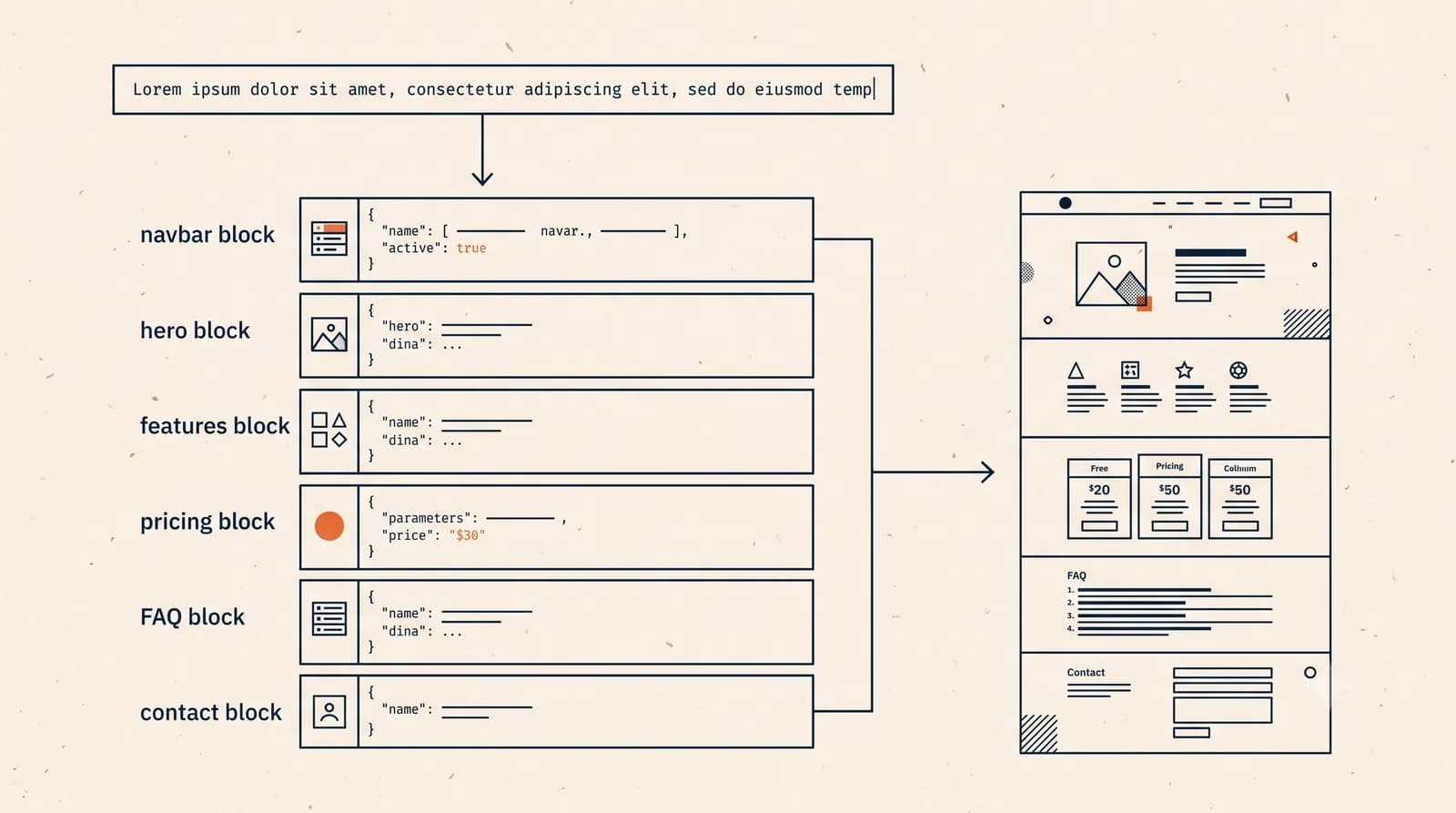
You type a sentence about your business. A few minutes later there's a finished website sitting in front of you, with sections, copy, images, and a layout that holds together. It can feel like a trick. It isn't. There's a sequence of steps happening behind the scenes, and once you understand them, the whole thing stops being mysterious and starts being something you can actually direct.
Here's the short version of how AI builds a website. It reads your prompt to understand what you do and who you serve. It decides which sections a site like yours usually needs. It writes draft copy for each one. It chooses a layout and picks images that match the tone. Then it assembles the page and hands it back to you so you can edit any part by describing the change. That's the loop, and it is the same core loop behind every AI website builder on the market. Let's walk through each step, honestly, including the parts where you still need to look closely before you hit publish.
In order, AI generates a website in five steps:
- Reads your prompt to understand your business type, audience, and goal.
- Chooses the sections a site like yours usually needs, from hero to contact.
- Writes draft copy for each section in a tone that fits your description.
- Picks a layout and images that match the vibe you asked for.
- Assembles the page and hands it back so you can edit any section by describing the change, then publish.
What happens the moment you write a prompt
The first job is understanding intent. When you write something like "a small bakery in Portland that does custom cakes and weekend pastry boxes," the AI is pulling out a lot from that one line. It identifies the business type, the location, the services, and the rough vibe. Bakery suggests warm and friendly, not corporate. Custom cakes suggests photos matter and a contact or quote step is important.
This is the part AI does genuinely well. Language models are trained on enormous amounts of text, so they've effectively seen what thousands of bakery sites, consultant sites, and freelance portfolios tend to say and how they're organized. They're good at pattern-matching your description to a sensible shape.
What it can't do is read your mind. If your bakery's whole thing is gluten-free, and you didn't mention it, the AI won't know. It works from what you give it. The more specific your prompt, the closer the first draft lands. A vague prompt gets you a generic site. A detailed one gets you something that already sounds like you.
Choosing the sections
Once the AI knows what kind of site you need, it decides on structure. Most sites share a backbone: a hero section up top with your main message, then something about what you offer, maybe social proof, maybe pricing, an about section, and a way to get in touch.
The AI picks from this menu based on your business. A service provider gets a services grid and a contact form near the top, because people want to book. An online shop gets product sections and clear pricing. A portfolio leads with work samples. These aren't random choices. They reflect common, sensible patterns for each type of site, the kind a decent web designer would reach for too.
You can see this logic in action on our how it works page, and the templates give you a feel for the section patterns different business types tend to use.
One honest caveat. The AI guesses at the right sections, and its guess is usually fine, but it's still a guess. You might not want a pricing section if your prices vary too much to list. You might want a section the AI didn't include. That's normal, and it's why editing exists.

Writing the copy
Now it fills in the words. For each section, the AI writes draft text: a headline, supporting lines, button labels, the about paragraph, short blurbs under each service. It keeps a consistent tone across the page, so the friendly bakery doesn't suddenly sound like a law firm three sections down.
This is where I want to be careful, because copy is where AI both shines and stumbles. It shines at structure and flow. The headlines scan well, the paragraphs are the right length, the calls to action are clear. You won't get rambling walls of text.
Where it stumbles is specifics. The AI doesn't know your actual prices, your real opening hours, the name of your signature cake, or the exact promise you make to customers. So it writes plausible-sounding placeholders. "Award-winning custom cakes for every occasion" reads fine, but did you win an award? If not, that line has to go. Treat the generated copy as a strong first draft written by someone who's never met you. The bones are good. The truth is your job.
Picking the layout and images
With sections and copy in place, the AI handles design. It selects a layout, sets spacing and alignment, chooses fonts that fit the tone, and applies a color scheme. A bakery might get warm tones and rounded shapes. A finance consultant might get cooler colors and tighter, more formal spacing.
For images, it pulls visuals that match the mood and subject. Pastry photos for the bakery, clean office shots for the consultant. These are stand-ins that make the page feel complete instead of leaving gray boxes everywhere.
Be clear-eyed about images, though. Stock-style photos placed by AI are there to fill the frame, not to represent your actual products. The cake on your hero might not be a cake you've ever made. Swap in your own photos before publishing whenever you can. Real photos of real work outperform generic ones every time, and they make the difference between a site that looks like a template and a site that looks like yours.
You can browse the styling and design options on the features page to see what's adjustable once the first version exists.
Assembling the page
The last generation step ties it together. The AI takes the sections, the copy, the chosen layout, and the images, and assembles them into one coherent page. It handles the technical part you'd otherwise dread: the responsive behavior so the site works on phones, the spacing between blocks, the navigation, the basic structure underneath.
This is the step that used to take days of fiddling with code or wrestling a clunky drag-and-drop tool. Now it's the part you don't think about at all. The page just comes out assembled and working. If you want the deeper background on building this way, our guide on how to build a website with AI covers the workflow end to end, and the piece on making a website without coding is worth a read if the technical side is what's been holding you back.
A concrete example
Say you write this prompt:
"Freelance interior designer based in Austin. I help homeowners redesign living rooms and home offices. Calm, modern style. I want people to book a consultation."
Here's roughly what comes back. A hero section with a headline about transforming your space and a clear "Book a consultation" button. A short about section describing the designer's approach. A services block with two or three offerings: living room design, home office design, maybe a styling consultation. A small gallery area for project photos. A simple contact or booking section near the bottom. Calm, modern styling with muted colors and clean type, matched to the words "calm, modern" in the prompt.
The copy reads naturally on the first pass. But look closer and you'll find the gaps. The about section invents a backstory you didn't provide. The services might list a "full home renovation" you don't actually offer. The gallery has stock interiors, not your work. The booking button might link nowhere until you connect it.
None of that is a failure. It's exactly the right starting point. You spend the next twenty minutes fixing facts, swapping photos, and tightening the lines that don't sound like you, instead of spending three days building from scratch.
Editing by section, then publishing
This is the part that makes the whole approach practical. You don't have to accept the first draft or start over. You refine one section at a time by describing the change. "Make the headline shorter." "Change the second service to kitchen design." "Use a warmer tone in the about section." The rest of the page stays put while that one piece updates.
That section-by-section control is the difference between an AI that produces a take-it-or-leave-it page and one you can actually shape into your site. Generation gets you 80 percent of the way in minutes. The editing loop gets you the last 20 percent that makes it real.
Before you publish, run a quick checklist. Are all the facts accurate? Are the prices and contact details real? Have you replaced placeholder photos with your own? Does the copy sound like you and not a generic template? Once that's clean, you publish. If search traffic matters to you, the basics in our website SEO basics guide will help you get the structure and content working in your favor, and you can check plans on the pricing page when you're ready to go live.
What AI does well, and what it doesn't
Let me lay it out plainly, because the honest version is more useful than the hyped one.
AI is strong at speed, structure, and starting points. It removes the blank-page problem. It handles layout, responsiveness, and the technical assembly you'd otherwise pay someone for or struggle through yourself. It writes clean, readable draft copy fast.
AI is weak at truth and nuance. It doesn't know your real details, so it fills gaps with confident-sounding placeholders. It can't judge whether a claim is accurate. It doesn't know your brand voice until you teach it through edits. And it has no idea which of your offerings actually matters most to your customers.
So the right mental model isn't "AI builds my website." It's "AI builds my first draft, fast, and I direct the rest." That framing keeps your expectations honest and your final site better.
The takeaway
AI website generation isn't magic, and it isn't a finished product out of the box. It's a well-organized sequence: understand the prompt, choose sections, write copy, design the look, assemble the page. Each step does real work, and each leaves something for you to check. The model handles the heavy, repetitive parts in minutes. You handle the facts, the voice, and the photos that make it yours.
If you've been putting off your site because the building part felt too big, this changes the math. You're no longer starting from nothing. You're starting from a complete draft and editing toward done. Write a clear prompt, see what comes back, fix what's off, and publish. That's the whole thing.