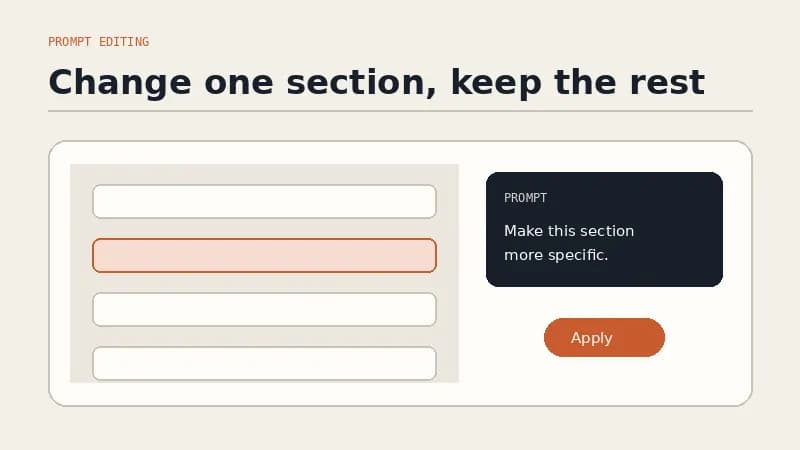
TL;DR: An AI website builder you edit by talking replaces the drag and drop editor with a sentence: point at a section, say what should change, and only that section gets rebuilt. Several builders now offer some flavour of this, but they differ on the unit of the edit. Whole project regeneration puts your approved sections back in the lottery. Section level editing does not. That single distinction matters more than any feature list.
Every website builder on the market in 2026 claims some version of "just describe what you want." The first draft is no longer the hard part. Any of them will hand you a plausible looking homepage in a few minutes. The question that decides whether you still have a maintained website six months later is what happens on the second change, and the twentieth.
This is a guide to judging that. What editing by talking actually means, which builders genuinely do it, where the honest limits sit, and a ten minute test you can run before you pay anyone.
What does "edit by talking" actually mean?
It means the interface for changing your website is a description of the outcome, not a sequence of operations.
In a conventional builder, moving your testimonials above the booking form is a small project: find the section, select the container, drag it, check it did not break the spacing, check the mobile breakpoint, publish. In a builder you edit by talking, it is one sentence: "Move the testimonials above the booking form." The builder works out the implementation.
One honesty note before we go further, because the phrase misleads people. "Talking" here means plain language, not voice. You are typing a sentence, not dictating into a microphone. Forgelo has no voice input and neither do the mainstream alternatives. If you were hoping to redesign your homepage while driving, that product does not exist yet. What does exist is the removal of the translation step between "I want the headline to sound less corporate" and the thing you have to click to achieve it.
Three parts make the workflow work, and builders differ on all three:
- Selection. Can you point at one section, or does the instruction apply to the whole page?
- Scope of the rebuild. Does the builder change what you asked about, or regenerate everything around it too?
- Review. Do you get to see the change and refine it before it is live, or does it publish as it goes?
Get selection and scope right and the tool becomes something you actually use. Get them wrong and it becomes a slot machine you stop pulling. If you want the mechanics in more depth, our guide to editing a website by prompt walks through the full loop, and what prompt to website means covers the generation side.
Which AI website builders let you edit by talking?
More than you would expect, but not in the same way. Here is what each one currently says about the step after generation, taken from their own live pages rather than from a roundup.
| Builder | What happens after the first draft | Unit of the edit | Aimed at |
|---|---|---|---|
| Forgelo | Click a section, describe the change, that section is rebuilt | One section | Small businesses, freelancers, agencies |
| Wix | Conversational prompting with the Aria agent, plus drag and drop | Element or page, hybrid | Businesses wanting a large app ecosystem |
| Framer | AI agent creates editable pages and sections, then you refine on the canvas | Page or component, design led | Designers and product teams |
| Squarespace | Fluid Engine drag and drop grid editing | Block on a grid | Portfolios and visual brands |
| Durable | Drag and drop editor for layout, images, headings, fonts | Block | Sole traders wanting a fast one pager |
| Hostinger | Describe to get a first version, then customise in the drag and drop editor | Block | Budget sites with hosting bundled |
| Lovable, Bolt, v0 | Keep chatting, the project rebuilds | Whole project or app | Developers and technical founders |
A few things worth pulling out of that table.
Wix is more conversational than its reputation suggests. Its AI website builder page describes flowing "between conversational prompting with Aria, your AI agent, and precise drag and drop editing." Framer is similar in spirit: its AI features page says the agent "creates editable pages, sections, copy, and visuals directly in your project," after which you refine on the canvas. Both are genuinely hybrid, and both assume you are comfortable finishing the job in a visual editor.
Durable, Hostinger and Squarespace are honest about where the conversation ends. Durable's AI website builder page lists the drag and drop editor as step three, for controlling "the layout, images, headings, fonts." Hostinger's website builder page puts it plainly: "Describe what you need to get a first version in seconds. Then customize every detail with the drag-and-drop editor." Squarespace's website design page leads with "Edit with drag-and-drop" on its Fluid Engine grid. In all three, AI writes the draft and you take it from there by hand.
Lovable, Bolt and v0 are the most conversational of all, and the least suited to this job. Lovable's documentation describes building "production-grade web applications using natural language" with frontend, backend, database, authentication and integrations "backed by editable code." Vercel's v0 docs promise you can "ship features, refine designs, update copy, and create live prototypes, all with a prompt." Bolt's homepage offers to "create stunning apps & websites by chatting with AI." These are excellent tools that solve a different problem: they build software, and they hand you a codebase and a deployment decision along with it. We compared that route directly in Forgelo vs v0 and Bolt.
Why the size of the edit matters more than the chat box
Here is the contrarian bit, and the thing nobody puts in a feature comparison.
A chat box is easy to add. Almost every builder has one now. What is hard, and what almost nothing tells you on the pricing page, is the unit of the edit: how much of your site is at risk when you ask for a change.
Picture a homepage with six sections. You are happy with five of them. The services section is weak.
On a builder that regenerates the project, you type your request and get a new page. The services section is better. The hero is also different, because the model reinterpreted your original brief. The testimonials you carefully worded have been paraphrased. You now spend twenty minutes recovering the parts that were already fine. Do that twice and you learn the lesson every user of these tools learns: stop asking for changes. The site freezes at whatever the AI produced on day one.
On a builder with section level editing, you click the services section, describe the change, and five sections do not move. The risk of asking is small, so you keep asking. That is the whole mechanism. Not intelligence, not model quality: blast radius.
This is the architecture Forgelo is built on. A site is a document of section nodes, and an edit replaces one node and re-renders. The features page puts it as "click a section and tell Forgelo what to do differently. It rebuilds just that part and leaves the rest alone," and the how it works page shows the same loop end to end. It is a boring technical decision that turns out to be the entire user experience.
So when you evaluate a builder that advertises conversational editing, the question is not "does it have a chat box." It is: what did the rest of my page do while it answered?
What does editing by talking look like in practice?
The instruction quality matters as much as the tool. Vague prompts produce vague sections, on every platform. The pattern that works is: change, audience, goal, required facts, tone, constraints.
| Section | Weak instruction | Instruction that works |
|---|---|---|
| Hero | "Make it better" | "Rewrite the hero for restaurant owners in Bandung. Lead with same day delivery, keep the photo, use Order on WhatsApp as the button." |
| Services | "Add services" | "Add two services, catering and corporate boxes. Four items total, outcome first headings, one sentence each, keep the current layout." |
| Proof | "Make us look credible" | "Rebuild this section around the three customer quotes below. Do not invent names, numbers, or awards." |
| Pricing | "Add prices" | "Add a three tier pricing table using these exact numbers. Mark the middle tier as most popular. No discount language." |
| CTA | "Make it convert" | "Change the closing call to action for people who are not ready to buy. Invite them to ask a question on WhatsApp instead." |
Two habits raise the hit rate on any builder. First, supply the facts. AI is good at organising information and bad at knowing your prices, so put the real numbers in the prompt and tell it not to invent anything else. Second, say what must not change. "Keep the current layout and the testimonial wording" is often the most valuable half of the instruction.
And review before publishing, every time. Faster editing makes review more important, not less, because the cost of publishing something wrong did not go down. Check the prices, check the claims, read the headings in sequence, and open the page on a phone. Our website SEO basics guide covers what to keep intact when copy changes.
What does it cost?
Prompt editing is not a premium tier feature on Forgelo, which is worth saying because it often is elsewhere. Every plan includes it.
The ladder is free to start: one published site on a Forgelo subdomain with a "Made with Forgelo" badge, so you can generate a real site for your real business and edit it before you decide anything. Paid plans are $9, $19, and $39 per month for Starter, Pro, and Business, adding custom domains, more sites, badge removal, and analytics as you go up. Edits and generations draw from the same AI allowance, and each plan has a daily limit rather than a hard monthly cliff. The current numbers per plan are on the pricing page.
One thing we will not pretend about: the Agency plan is custom, and full white label with your own logo and domain is on the roadmap, not shipped. If white label is a requirement for you today, take that at face value and check back rather than signing up hoping.
For the wider cost picture against freelancers and agencies, how much a website costs breaks the numbers down properly.
When is a prompt based builder the wrong choice?
We build one of these, so treat this section as the part where the sales pitch stops.
You need software, not a website. User accounts, a client portal, role based permissions, custom booking logic, a marketplace. Describing those to a website builder produces a page that looks like the feature rather than the feature. Go to Lovable, Bolt, v0, or a developer.
You want art direction down to the pixel. If the layout is the product, a prompt is a blunt instrument. Framer gives you a real design canvas and the AI to accelerate it. Use that.
Your site depends on a plugin ecosystem. Complex stores, bookings across multiple staff and locations, membership tiers, unusual payment flows. Wix and WordPress have a decade of integrations you cannot replicate with a description.
You already have a site that converts. The best reason to change platforms is that the current one is stopping you from making changes. If your existing site works and you only touch it twice a year, migrating is a hobby, not a business decision.
If none of those describe you, and what you actually need is a clear business site that stays easy to update, that is exactly the shape prompt editing fits. Our AI website builder guide covers the category in full, and making a website without coding covers the broader no code routes.
How do you test the claim in ten minutes?
Do not take anyone's word for this, ours included. Every builder here has a free path to a generated draft. Run this on two of them with your real business description.
- Generate with your actual business, not the demo prompt. Read the copy. Is it about your business, or could it belong to any business in your industry?
- Ask for one specific change to one section. Something like "make the hero specific to office cleaning for small clinics."
- Now check the other sections. This is the real test. Did they move? Did the wording drift? If yes, you have found the ceiling on how often you will edit this site.
- Ask for a change that requires a fact. Add a real price. See whether it uses your number or invents a neighbouring one.
- View the published page source. One
<h1>, a real title tag, a meta description, a sitemap. Missing basics here mean invisible later. - Send yourself a test lead. If it lands in an inbox nobody opens, the site is decoration. Forms that route to WhatsApp get answered.
Whichever builder survives that test is the one to pay for. If you want to run it on ours, you can start from a template or describe your business from scratch, publish to a subdomain, and pay nothing until you want a custom domain. If you would rather see the field first, our honest ranking of the best AI website builders puts seven of them side by side, including where we lose.